
A comparison between Misultin, Mochiweb, Cowboy, NodeJS and Tornadoweb
As some of you already know, I'm the author of Misultin, an Erlang HTTP lightweight server library. I'm interested in HTTP servers, I spend quite some time trying them out and am always interested in comparing them from different perspectives.
Today I wanted to try the same benchmark against various HTTP server libraries:
- Misultin (Erlang)
- Mochiweb (Erlang)
- Cowboy (Erlang)
- NodeJS (V8)
- Tornadoweb (Python)
I've chosen these libraries because they are the ones which currently interest me the most. Misultin, obviously since I wrote it; Mochiweb, since it's a very solid library widely used in production (afaik it has been used or is still used to empower the Facebook Chat, amongst other things); Cowboy, a newly born lib whose programmer is very active in the Erlang community; NodeJS, since bringing javascript to the backend has opened up a new whole world of possibilities (code reusable in frontend, ease of access to various programmers,...); and finally, Tornadoweb, since Python still remains one of my favourites languages out there, and Tornadoweb has been excelling in loads of benchmarks and in production, empowering FriendFeed.
Two main ideas are behind this benchmark. First, I did not want to do a "Hello World" kind of test: we have static servers such as Nginx that wonderfully perform in such tasks. This benchmark needed to address dynamic servers. Second, I wanted sockets to get periodically closed down, since having all the load on a few sockets scarcely correspond to real life situations.
For the latter reason, I decided to use a patched version of HttPerf. It's a widely known and used benchmark tool from HP, which basically tries to send a desired number of requests out to a server and reports how many of these actually got replied, and how many errors were experienced in the process (together with a variety of other pieces of information). A great thing about HttPerf is that you can set a parameter, called --num-calls, which sets the amount of calls per session (i.e. socket connection) before the socket gets closed by the client. The command issued in these tests was:
httperf --timeout=5 --client=0/1 --server= --port=8080 --uri=/?value=benchmarks --rate= --send-buffer=4096
        --recv-buffer=16384 --num-conns=5000 --num-calls=10
The value of rate has been set incrementally between 100 and 1,200. Since the number of requests/sec = rate * num-calls, the tests were conducted for a desired number of responses/sec incrementing from 1,000 to 12,000. The total number of requests = num-conns * rate, which has therefore been a fixed value of 50,000 along every test iteration.
The test basically asks servers to:
- check if a GET variable is set
- if the variable is not set, reply with an XML stating the error
- if the variable is set, echo it inside an XML
Therefore, what is being tested is:
- headers parsing
- querystring parsing
- string concatenation
- sockets implementation
The server is a virtualized up-to-date Ubuntu 10.04 LTS with 2 CPU and 1.5GB of RAM. Its /etc/sysctl.conf file has been tuned with these parameters:
# Maximum TCP Receive Window
net.core.rmem_max = 33554432
# Maximum TCP Send Window
net.core.wmem_max = 33554432
# others
net.ipv4.tcp_rmem = 4096 16384 33554432
net.ipv4.tcp_wmem = 4096 16384 33554432
net.ipv4.tcp_syncookies = 1
# this gives the kernel more memory for tcp which you need with many (100k+) open socket connections
net.ipv4.tcp_mem = 786432 1048576 26777216
net.ipv4.tcp_max_tw_buckets = 360000
net.core.netdev_max_backlog = 2500
vm.min_free_kbytes = 65536
vm.swappiness = 0
net.ipv4.ip_local_port_range = 1024 65535
net.core.somaxconn = 65535
The /etc/security/limits.conf file has been tuned so that ulimit -n is set to 65535 for both hard and soft limits.
Here is the code for the different servers.
Misultin
-module(misultin_bench).
-export([start/1, stop/0, handle_http/1]).

start(Port) ->
    misultin:start_link([{port, Port}, {loop, fun(Req) -> handle_http(Req) end}]).

stop() ->
    misultin:stop().

handle_http(Req) ->
    % get value parameter
    Args = Req:parse_qs(),
    Value = misultin_utility:get_key_value("value", Args),
    case Value of
        undefined ->
            Req:ok([{"Content-Type", "text/xml"}], ["no value specified"]);
        _ ->
            Req:ok([{"Content-Type", "text/xml"}], ["", Value, ""])
    end.
Mochiweb
-module(mochi_bench).
-export([start/1, stop/0, handle_http/1]).

start(Port) ->
    mochiweb_http:start([{port, Port}, {loop, fun(Req) -> handle_http(Req) end}]).

stop() ->
    mochiweb_http:stop().

handle_http(Req) ->
    % get value parameter
    Args = Req:parse_qs(),
    Value = misultin_utility:get_key_value("value", Args),
    case Value of
        undefined ->
            Req:respond({200, [{"Content-Type", "text/xml"}], ["no value specified"]});
        _ ->
            Req:respond({200, [{"Content-Type", "text/xml"}], ["", Value, ""]})
    end.
Note: i'm using misultin_utility:get_key_value/2 function inside this code since proplists:get_value/2 is much slower.
Cowboy
-module(cowboy_bench).
-export([start/1, stop/0]).

start(Port) ->
    application:start(cowboy),
    Dispatch = [
        %% {Host, list({Path, Handler, Opts})}
        {'_', [{'_', cowboy_bench_handler, []}]}
    ],
    %% Name, NbAcceptors, Transport, TransOpts, Protocol, ProtoOpts
    cowboy:start_listener(http, 100,
        cowboy_tcp_transport, [{port, Port}],
        cowboy_http_protocol, [{dispatch, Dispatch}]
    ).

stop() ->
application:stop(cowboy).-module(cowboy_bench_handler).
-behaviour(cowboy_http_handler).
-export([init/3, handle/2, terminate/2]).
init({tcp, http}, Req, _Opts) ->
{ok, Req, undefined_state}.
handle(Req, State) ->
{ok, Req2} = case cowboy_http_req:qs_val(<<"value">>, Req) of
{undefined, _} ->
cowboy_http_req:reply(200, [{<<"Content-Type">>, <<"text/xml">>}], <<"no value specified">>, Req);
{Value, _} ->
cowboy_http_req:reply(200, [{<<"Content-Type">>, <<"text/xml">>}], ["", Value, ""], Req)
end,
{ok, Req2, State}.
terminate(_Req, _State) ->
ok.NodeJS
var http = require('http'), url = require('url');
http.createServer(function(request, response) {
    response.writeHead(200, {"Content-Type":"text/xml"});
    var urlObj = url.parse(request.url, true);
    var value = urlObj.query["value"];
    if (value == ''){
        response.end("no value specified");
    } else {
        response.end("" + value + "");
    }
}).listen(8080);
Tornadoweb
import tornado.ioloop
import tornado.web

class MainHandler(tornado.web.RequestHandler):
    def get(self):
        value = self.get_argument('value', '')
        self.set_header('Content-Type', 'text/xml')
        if value == '':
            self.write("no value specified")
        else:
            self.write("" + value + "")

application = tornado.web.Application([
    (r"/", MainHandler),
])

if __name__ == "__main__":
    application.listen(8080)
    tornado.ioloop.IOLoop.instance().start()
I took this code and run it against:
- Misultin 0.7.1 (Erlang R14B02)
- Mochiweb 1.5.2 (Erlang R14B02)
- Cowboy master 420f5ba (Erlang R14B02)
- NodeJS 0.4.7
- Tornadoweb 1.2.1 (Python 2.6.5)
All the libraries have been run with the standard settings. Erlang was launched with Kernel Polling enabled, and with SMP disabled so that a single CPU was used by all the libraries.
Test results
The raw printout of HttPerf results that I got can be downloaded from here.
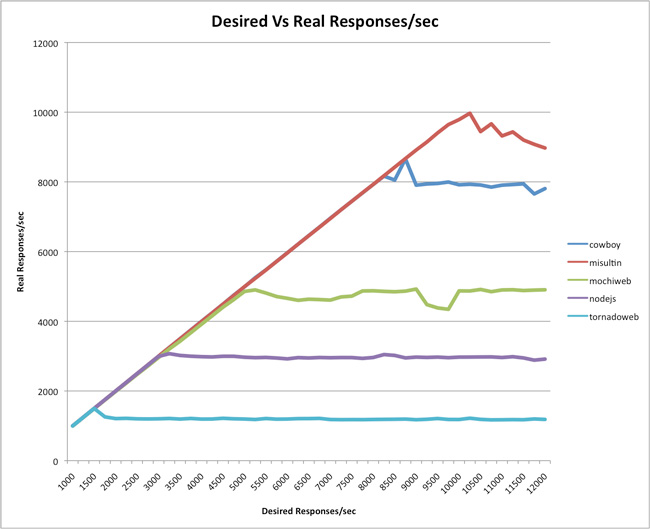
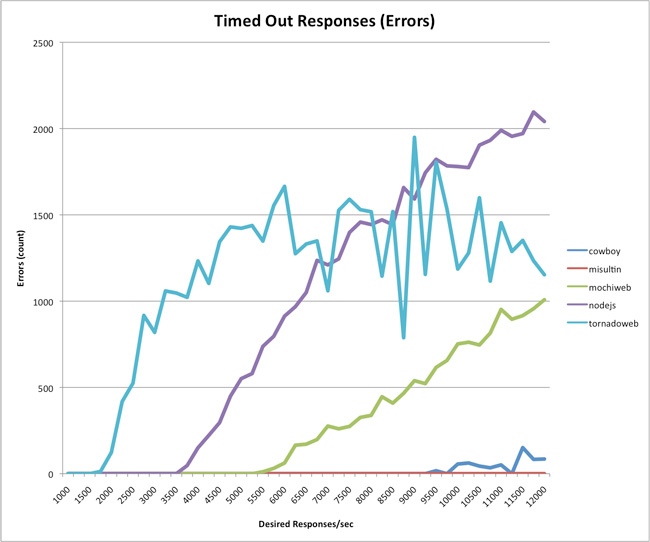
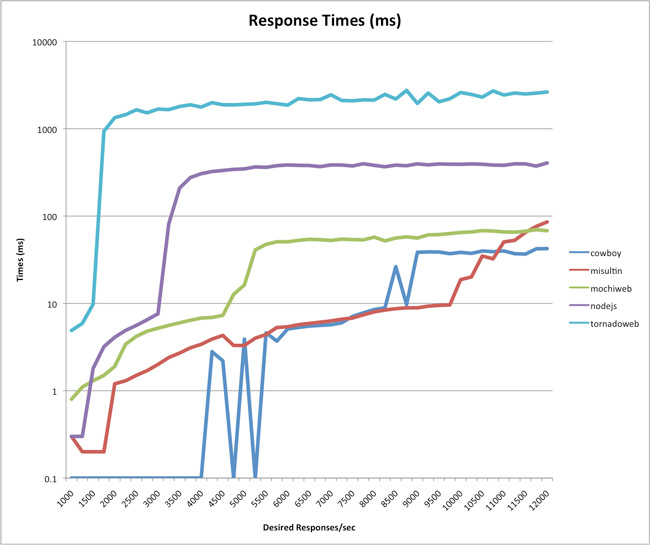
Note: the above graph has a logarithmic Y scale.
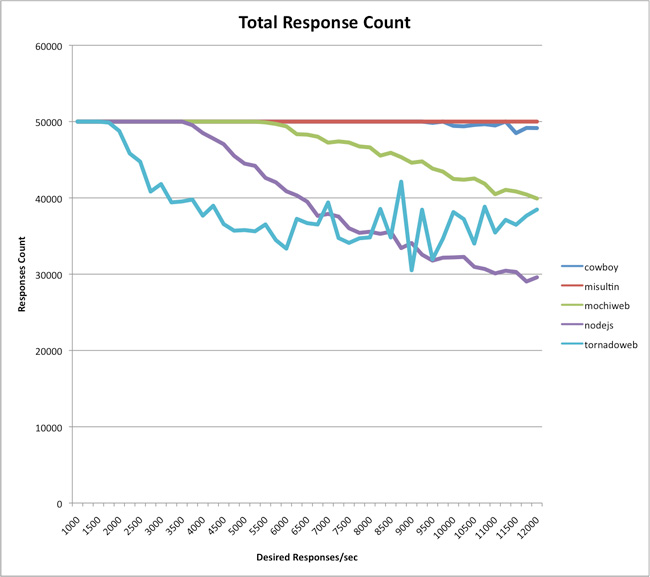
According to this, we see that Tornadoweb tops at around 1,500 responses/seconds, NodeJS at 3,000, Mochiweb at 4,850, Cowboy at 8,600 and Misultin at 9,700. While Misultin and Cowboy experience very little or no error at all, the other servers seem to funnel under the load. Please note that "Errors" are timeout errors (over 5 seconds without a reply). Total responses and response times speak for themselves.
I have to say that I'm surprised on these results, to the point I'd like to have feedback on code and methodology, with alternate tests that can be performed. Any input is welcome, and I'm available to update this post and correct eventual errors I've made, as an ongoing discussion with whomever wants to contribute.
However, please do refrain from flame wars which are not welcomed here. I have published this post exactly because I was surprised on the results I got.
What is your opinion on all this?
-----------------------------------------------------
UPDATE (May 16th, 2011)
Due to the success of these benchmarks I want to stress an important point when you read any of these (including mines).
Benchmarks often are misleading interpreted as "the higher you are on a graph, the best that *lib-of-the-moment-name-here* is at doing everything". This is absolutely the wrongest way to look at those. I cannot stress this point enough.
'Fast' is only 1 of the 'n' features you desire from a webserver library: you definitely want to consider stability, features, ease of maintenance, low standard deviation, code usability, community, developments speed, and many other factors whenever choosing the best suited library for your own application. There is no such thing as generic benchmarks. These ones are related to a very specific situation: fast application computational times, loads of connections, and small data transfer.
Therefore, please use this with a grain of salt and do not jump to generic conclusions regarding any of the cited libraries, which as I've clearly stated in the beginning of my post I all find interesting and valuable. And I still am very open in being criticized for the described methodology or other things I might have missed.